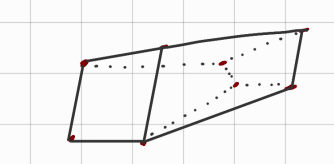
HCR - Triangular Meshes
Approximate any surface to a mathematical model made of triangles. Useful for creating simulations and VR-models.
- How to create a triangular mesh from a real world object:
- Scan the object.
- Obtain from the scan a cloud of points.
- Using the points from the cloud of points create the triangular mesh.
- Why is it a triangular mesh?
- Because 3 is the minimum number of points needed to create a plane.
- Each triangle has its own normal
- Calculating the normal of a plane is useful for the calculations of the optimal contact point of the robot.
Link to original
- ~Ex.: Cloud of points → Triangular mesh:
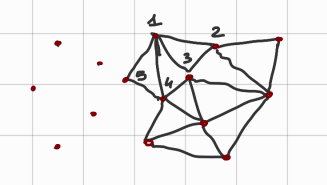
HCR - Bounding Box
NOT_SURE_ABOUT_THIS
Old notes taken really fastBounding Box
Let’s define the shape of our triangles with equations:
(Triangles equations are planes equations) #NOT_SURE_ABOUT_THIS
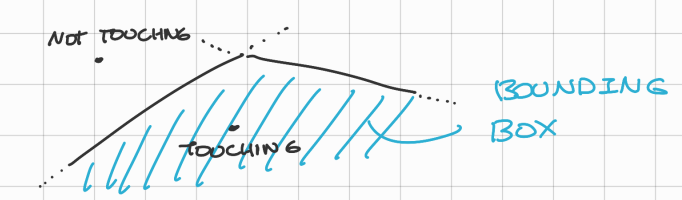
Nel disegno ho rappresentato due linee, è sbagliato, in quantoin uno spazio 3D rappresenta un piano e non una linea, per ottenere una linea in uno spazio 3D è necessario intersecare due piani.We can define being in an object if we are inside the bounding box, then we can say that we are “touching” that object.
→ We are in the bounding box if our current position respects all the inequalities:
(this is not entirely true, for just touch it should be , and for penetration but having it exactly equal to 0 is impossible).
Link to originalThe touching simulation and prevision is really good if the mesh has a lot of points (better approximation), but more points also mean more delay.
HCR - Interpolation
NOT_SURE_ABOUT_THIS
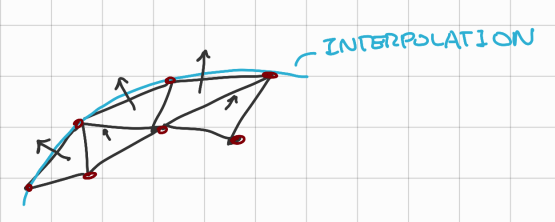
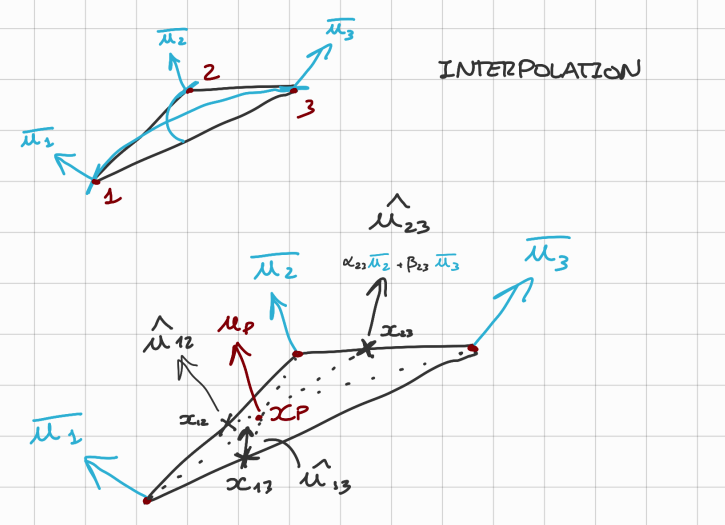
We consider to have the normal to each point/vertex of the triangular mesh, actually we should have the normal of each TRIANGLE of the mesh, so we would need to interpolate especially when we are near a vertex
For each triangle in our triangular mesh there is only one normal, to solve thins, we can then make an interpolation:
- So the normal now becomes a smooth function (always depending on the position), before as we can see in the figure we have that the normal is constant for each triangle so we have a non-smooth transition when we pass from one triangle to another.
When we have fewer points then we can take the interpolation:
→ Where:
Considering:
- Distance between and as:
- Distance between and as:
- Distance between and as:
All of them positive (distances cannot be negative)
→ Generally we have:
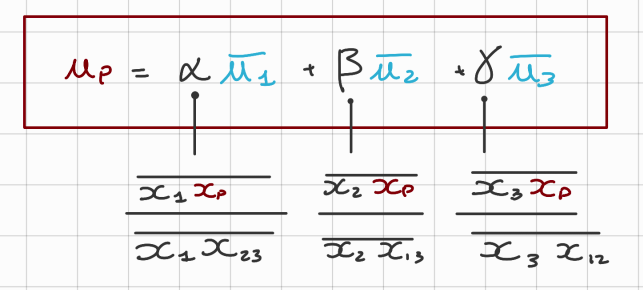
Considering now 3 points (for a triangle): , with their respective normals:
→ The interpolated normal of can be calculated as:
Link to original
HCR - How to select a sample triangle
- OCTATREE method:
- TODO SEARCH FOR OCTATREE METHOD
Given 8 points create a 3D object (parallelepiped)
Link to original
- Creating 6 planes that you can play with.